For fire, security and building-services contractors. From the first survey to the final invoice, every hand-off has a home: sales, surveying, estimating, purchasing, installation, service and finance. Engineers work from an app that keeps going without signal, and your customers get a portal that shows them how their sites are running.
Founder-led and UK-based. We onboard a small number of new customers at a time.
Start wherever the work starts. Every team picks it up from there.
Begin with a survey, a quote, an install or an estate you have taken over. Wherever you start, the record carries on, and every hand-off has a named place to land: an inbox, an owner, an approval or a job stage.
SalesSurveyor
Survey it first, and the record starts complete.
Raise the survey from the enquiry and the customer, site and enquiry come with it. Surveyors capture every device on the drawing and in the app, so the record starts complete.
Devices with location, make, model and serial
Marked-up photos, and notes typed or dictated by voice
Question sheets and stage checklists for fire, intruder, CCTV and access
A survey report generated from the record
Survey visits booked on the universal planner
AI assists
Identifies a device from a photo and pre-fills its details.
The surveyor checks and saves it.
Gate
Survey linked to its enquiry
Hands on
Surveyed devices on the drawing
11:054GNo service
Meridian House · Survey
Asset captureAdd assetCapture details
Choose a categoryFire - Smoke
LocationAdd
No location selectedBoardroom
ExcellentGoodFairPoorCritical
NameAuto
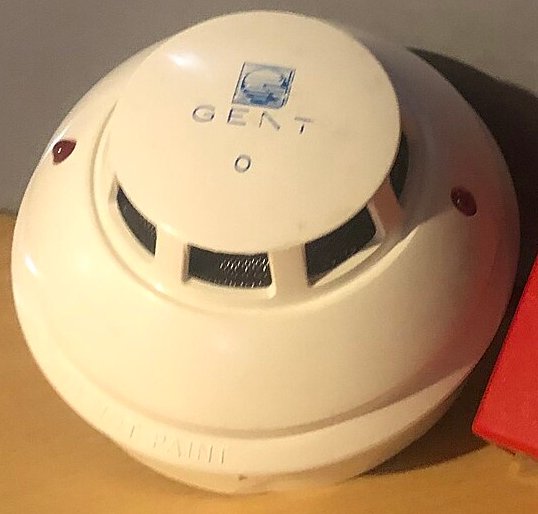
Gent by Honeywell S-Quad series smoke detector, likely S4-710 optical/heat multisensorGent 17840 Optical
Gent by Honeywell
S-Quad series smoke detector, likely S4-710 optical/heat multisensor17840 Optical
Photos0 of 51 of 5
Add photoTake one, or pick one from the phone
DrawNotes
Identify from photoIdentifying…
Identified from photo91%
Category
Fire - Smoke
Manufacturer
Gent by Honeywell
Model
S-Quad series smoke detector, likely S4-710 optical/heat multisensor
The device is a ceiling-mounted fire detector with black smoke-entry vents around the head and red status LEDs on the sides, indicating a smoke/multisensor detector rather than a heat-only device. The Gent logo is clearly visible on the top cover.
ApplyDismiss
Applied: category Fire - Smoke, manufacturer, model, name.
Save & returnSave & add another
Meridian House · Survey
SurveyGround floor survey
Captured assets3 captured
Call point · ReceptionCall point · Reception
Smoke detector · StudioSmoke detector · Studio
Gent 17840 OpticalFire - Smoke · BoardroomSyncing
Add asset
Survey capture run-through
Real photo and real result. Screens illustrative.
Device photo: Tvtoaster, CC BY-SA 4.0, cropped. Identification captured from the live engine on 12 Oct 2026; the site is fictitious.
SurveyorEstimator
Price it, surveyed or not.
Add the surveyed devices to the draft quote in one step, or build it from your catalogue. The estimator checks the quantities and prices anything that isn’t in the catalogue, and approval rules catch value and margin before it goes out.
Starting here? Create a quote straight from your catalogue and price lists. No survey needed.
AI assists
Scope Analysis reads the specification. Enhance rewrites the quote description in your tone of voice, without adding facts.
The estimator checks every change.
Gate
Approval rules on value and margin
Hands on
A priced quote, sent and locked
Surveyed devices and quantities as quote lines
Catalogue prices from your own price lists
The survey’s design checklist on the quote
Approval when value, margin or discount calls for it
Quotes
Quotes / Q-2026-00142Draft
Fire alarm upgrade — Meridian House
DescriptionBI•Enhance
Enhanced text accepted. You can keep editing, or undo the enhancement until you change the text. Undo enhance
supply and fit 14 new smoke detectors to levels 00 and 01 at meridian house. replace 2 call points at main stair. re-address existing beacons onto new loop. works out of hours. price valid til 30 Nov
Thank you for the opportunity to quote. We will supply and install 14 new smoke detectors on levels 00 and 01 at Meridian House, replace the 2 call points at the main stair, and re-address the existing beacons onto the new loop. All works will be carried out out of hours. This price is valid until 30 Nov.
Enhancing your descriptionThis can take a minute or so.
Review the enhanced descriptionIn your tone of voice (v3). Nothing changes until you accept.
Thank you for the opportunity to quote. We will supply and install 14 new smoke detectors on levels 00 and 01 atMeridian House, replace the 2 call points at the main stair, and re-address the existing beacons onto the new loop. All works will be carried out out of hours. This price is valid until 30 Nov.
What changed6 changes
Needs a look
Check: “30 Nov”Written as “30 Nov”. The quote’s expiry date is 31 Dec 2026.
Use my wordsChecked
Kept your words: “30 Nov”
Tone of voice
“supply and fit” → “We will supply and install”To match your tone of voice.
Linked to the quote
“meridian house” → {{site.name}}Shows as Meridian House. It stays right if the quote changes.
1 to checkAll checkedKeep my wordsAccept
Scroll sideways to see the whole screen.
Enhance run-through
Illustrative. Sample quote, site and figures.
CustomerOperations
Accepted means ordered.
When the customer accepts online, the sales order is created there and then, frozen exactly as quoted. Your catalogue and supplier price lists turn it into draft purchase orders, one per supplier, at current cost. Nothing is bought or invoiced until a project lead is named.
Gate
A named project lead
Hands on
Equipment ordered and received
The frozen order, line for line
Purchase orders per supplier, at current cost
Deliveries booked in against what was ordered
Supplier bills matched to the order and the delivery
Products
Catalog
Live company product lists that can be added to enquiries or quotes.
ImportExportNew Product
Search by name or SKUAll productsUncategorisedActive equipment
PO-2026-00313Direct Systems · 1 line · £1,240.00Draft
Scroll sideways to see the whole screen.
Product catalogue run-through
Illustrative. Fictitious brands, suppliers and prices.
OperationsEngineers
Every device you install is on the record.
Convert a survey to an install and the surveyed devices carry on, with their drawing positions. Plan it on the universal planner, check it for clashes, then engineers work from the app, with or without signal.
Starting here? Raise the install straight from an accepted order or project, and the device records are created for you.
Gate
Office verification of the finished job
Hands on
Commissioned devices and a draft certificate
Booked on the universal planner, pencilled in then firm
The same asset records, from survey to commissioning
Install and commissioning checklists
Customer sign-off on the phone
A draft completion certificate for each system
Planner
People · work · site presence
Universal Planner
Schedule editable Tasks around real, read-only Case presence.
DayWeekMonthYear planFocusCapacityAnalyse planCommit plan 1
My TasksTeam TasksAll TasksTask, case, account, site or personStaged changes
Jo CarterSubcontractorContractor resources are visibility-only
Plan analysis1 staged change · not committed
Daily loadPriya Shah, Wed 14: 9.5h booked against 8h.
Same siteTom Ellis is at Canal Wharf Offices on Tue 13.
No overlapsNo non-working time or past dates.
AI notePriya’s Wednesday runs 1.5 hours over. Her Thursday is clear, and the first fix finishes on Tuesday, so Thursday would also follow on from Tom’s visit.
Keep editingCommit anyway
Version movedMeridian House · Install, Thu 15 was changed by R. Shah at 10:42, after you opened the plan. Your change to it has not been saved.
Reload planShow their change
Firm. Now in Priya Shah’s engineer app.
Scroll sideways to see the whole screen.
Universal Planner run-through
Illustrative. Sample people, sites and jobs.
Service deskEngineers and customer
Maintenance that remembers.
Planned maintenance visits are generated from the commissioned register, each picking up the last visit’s answers. Service cases move through clear stages, and the office reviews every outcome before the customer sees it.
Starting here? Taking over an estate? Import its asset register from a spreadsheet, set up the maintenance contract and plan the visits.
AI assists
Turns incoming email into a case and drafts the visit resolution.
The office confirms before scheduling and reviews before closing.
Gate
Office review before a case closes
Hands on
A maintained estate with its history
Maintenance visits from the commissioned register, planned on the universal planner
Each visit’s answers carried to the next
Cases from new to closed, and sent back if they aren’t right
Progress and outcomes in the customer’s portal
Service
Service inbox
Inbound service emails, read by AI and queued for review — accept to create a case, append to an existing one, or dismiss.
Refresh
PendingActionedDismissed
Facilities, Meridian Property09:12
Fire alarm fault showing on panel — level 2
Panel showing a fault on zone 4, level 2. Sounders not affected. Asking for an engineer today.
HIGHaccount ✓site ✓
Canal Wharf Offices08:47
Door reader on entrance not releasing
MEDIUMaccount ✓site ✓
Harbour Retail Group08:02
Quarterly visit — can we move it?
LOWaccount ✓no site
Create case
SiteMeridian House
TitleFire alarm fault — level 2, zone 4
SystemFire alarm
Reported byJ. Patel
AppendCreate case
Case CS-2026-00418 created
Service / Cases / CS-2026-00418
Fire alarm fault — level 2, zone 4
CS-2026-00418 · Meridian Property · Meridian House · North West
NEWTRIAGEDNo tierTier C3
Triage caseEdit caseUpdate status
OverviewWork ordersDocumentsTimeline
SLA clocks
ResponseStarts at triage3h 58m
ResolutionStarts at triage23h 58m
Source: Customer agreement—
Work orders
No work orders yet.
WO-2026-00657On-site workNot booked
Triage caseConfirm the SLA tier, the skills the job needs, and a rough time estimate. This moves the case to Triaged.
SLA tierC3 — respond 4h, fix 24h
SkillsFire alarm
Estimate2 h
CancelTriage
Cases
Every open case, ordered by what breaches first. The clock is the queue.
New jobMon 12 Oct 13:00 · Meridian House — Fire alarm fault
ViewDismiss
Your day
13:002 hFire alarm fault — level 2, zone 4Meridian House
15:301 hQuarterly fire alarm serviceRiverside Retail Park
Scroll sideways to see the whole screen.
Service run-through
Illustrative. Sample customer, case and people.
Operations and serviceFinance
Then it’s billed.
Invoice a sales order in full, by line or by percentage. Approved service charges become a draft invoice, and finance pushes issued invoices to Xero, one at a time or in bulk.
Gate
Only approved charges are billed
Hands on
Issued invoices in your accounts
Order invoices in full, by line or by percentage
Approved service charges as draft invoices
Every invoice linked to its order or case
Issued invoices pushed to Xero, as drafts or authorised
Invoices
Commerce / Sales orders / SO-2026-00218
SO-2026-00218
Meridian Property · Meridian House · Access control upgrade
Accepted
LineQtyRateNet
Door controller, 2-door4£640.00£2,560.00
Proximity reader8£118.00£944.00
Installation labour3 days£520.00£1,560.00
Commissioning and handover1 day£560.00£560.00
Order total£5,624.00
Raise invoice
Whole orderSelected linesPercentage
Door controller, 2-door£2,560.00
Proximity reader£944.00
Installation labour£1,560.00
Commissioning and handover£560.00
Invoice preview
Net£5,624.00£5,064.00
VAT 20%£1,124.80£1,012.80
Total£6,748.80£6,076.80
CancelRaise draft invoice
Commerce / Invoices / INV-2026-00042
INV-2026-00042
Meridian Property · from SO-2026-00218 · Not yet sent
DraftIssuedNot pushedPushed
Issue invoicePush to accountsPushing…Void
Overview
AccountMeridian Property
Billing basisSelected lines
Created12 Oct 2026
Due date11 Nov 2026
Finance push—Xero · INV-0457
Totals
Net subtotal£5,064.00
VAT 20%£1,012.80
Total£6,076.80
Finance push history
AttemptedFinance systemResultReference / details
No pushes yet.
12 Oct 2026, 14:05XeroPushedINV-0457
Issue this invoice?INV-2026-00042 · Meridian Property · £6,076.80
CancelIssue invoice
Draft invoice raised
Invoice pushed to accounts — INV-2026-00042
Settings / Integrations / Accounting
Accounting
XeroOK
Connected · Your Company Ltd
Last synced 12 Oct 2026, 14:05
Push as draftOn: invoices land as drafts for bookkeeper approval. Off: they are authorised immediately.
Default revenue account code200
Disconnect
Microsoft Dynamics 365 Business CentralComing soon
Not yet available
Scroll sideways to see the whole screen.
Invoicing run-through
Illustrative. Sample customer, order and figures.
An app your engineers will actually use.
A browser app, not another app-store download. It installs to the home screen, runs on phones, tablets and laptops, and keeps going without signal.
10:424GNo service
YCYour companySyncedOfflineSaving…
Morning, SamDay started
NOWP2DispatchedEn route
ServiceDetector fault — level 2 store roomMeridian House · M1 9ZZ
Access: Sign in at reception. Keys from facilities.
NOWP3Dispatched
MaintenanceQuarterly fire alarm serviceRiverside Retail Park · LS11 9ZZ
Start travelOpen current job
Your day
13:302 hQuarterly fire alarm serviceRiverside Retail ParkP3
16:001 hReader not releasing doorCanal Wharf OfficesP2
Completed today · 1
CS-2026-00412En routeOn site
Detector fault — level 2 store roomMeridian House · M1 9ZZNavigateCall site
WorkEvidenceDetailsDocuments
Engineer noteOffice only
Replaced the detector head in the store room. Loop tested, panel clear.What you found and what you did
Save note
Saved on this phone until you have signal
Time
Travel time0 h 25 m
Time on siteRunning
PhotosAdd photo
Queued
Photos save on this phone and upload when there’s signal — they never hold up the job.
Parts usedAdd from van
Optical detector headVan stock× 1
ArrivedComplete & sign off
CS-2026-00412
Final stepJob completeConfirm your time, say what you did, then hand the phone to the customer to sign.
Work carried out
Detector head in the store room had failed. Replaced it and tested the loop. Panel clear.
Job outcome
Work completeFurther attendance needed
Customer signature
Sign here — customer confirmation of works
Jordan Ellis · Facilities manager
Capture signature & save signed recordSign-off captured
Saved on this device. Sync will resume when a connection returns.
Staff sign in with their own account or Microsoft 365. Subcontractors use an access code from the office.
Safe on a shared device
When someone else signs in, the last person’s job data is wiped from the device first.
Visits that remember
Each maintenance visit starts with the last visit’s answers for every device.
Identifying a device from a photo, voice dictation, catalogue search and the first download of jobs need a connection. Changes send while the app is open. iPhone job alerts need iOS 16.4 or later and the app on the home screen.
Built for the golden thread on fire systems: versioned cause-and-effect with recorded approvals and modification certificate references for higher-risk buildings, signed-off records that show every later change, and reports you can reproduce as issued.
Visit recordMeridian House · Fire alarm · Quarterly service
Signed4 of 4At customer sign-off · 10 Sep 2026, 11:42
Illustrative record. Fictitious site and names.
Tamper-evident sign-offs
Visit answers are frozen when they are signed. Anything changed later is shown beside the signed value with who changed it and when.
Device history that stays
Every lifecycle change is recorded with who made it, when and why. A device with a history can’t be deleted.
Versioned cause-and-effect
Fire matrices move from draft to current, and can be imported from supported fire panel files. On higher-risk buildings every change needs a recorded approval and a modification certificate reference.
Documents and O&M editions
Documents keep every version. O&M register editions are frozen and numbered; publish one and each asset row carries a QR code for reporting a fault on site.
AI that works for you, under your control.
AI reads, flags and drafts; people decide. It uses leading models from OpenAI, Anthropic and Google, with guardrails built in, and you choose what is switched on.
The right model for each task
Each task runs on its own chain of models from OpenAI, Anthropic and Google, with automatic fallback. New models are added behind the scenes, so the platform improves without you changing a thing.
Guardrails built in
AI writes in your tone of voice, never adds prices, dates or promises, and sees only what the person using it can see. A person applies every change.
You’re in control
Switch the Assistant, dictation and Scope Analysis off yourself, and we will switch off any other AI feature for you. Ordinary work carries on either way.
SiteSurvey365 is built by the team behind Bluepoint, one of the world’s leading visitor management platforms: people who build systems for businesses, and run their own.
Onboarding typically takes weeks, not months, and the plan is agreed with you before you sign. How onboarding works
Bring one workflow where a hand-off goes wrong, from survey to invoice. We will show you how it runs on one platform, with AI doing the reading and your people doing the deciding.